
CalcSolver Trigonometry Calculator 2026
Angles are everywhere, even if we don’t notice them. They help us measure the height of buildings, design bridges, navigate aircraft, create 3D graphics, and solve countless engineering and scientific problems. Trigonometry is the branch of mathematics that makes these calculations possible by describing the relationship between angles and the sides of triangles.
I built this CalcSolverTrigonometry Calculator to help you understand trigonometry through clear explanations, practical examples, and real mathematical applications. You’ll learn how trigonometric functions work, when to use them, and how CalcSolver evaluates angles, solves trigonometric expressions, and performs high-precision calculations, making both basic and advanced trigonometry much easier to understand.
What Is Trigonometry?
Trigonometry is a branch of mathematics that studies the relationship between the angles and sides of triangles. It helps us calculate unknown lengths, measure angles, and solve geometric problems that would otherwise be difficult using basic arithmetic or algebra alone. This makes trigonometry an essential topic in mathematics, engineering, physics, architecture, navigation, and computer graphics.
I think of trigonometry as one of the most practical areas of mathematics because it explains how angles and distances work together in the real world. That’s why I designed CalcSolver to evaluate trigonometric functions, solve expressions involving angles, support both degrees and radians, and generate accurate results instantly, helping you solve everything from simple triangle problems to advanced scientific calculations with confidence.
Why Trigonometry Is Important
Trigonometry is much more than a school subject because it helps solve real-world problems that involve angles, distances, heights, and directions. I use trigonometric concepts to explain how engineers design bridges, architects create stable buildings, pilots navigate aircraft, surveyors measure land, and computer systems generate realistic 3D graphics. Without trigonometry, many modern technologies and scientific calculations would not be possible.
I built CalcSolver to make these calculations simple and accurate for everyone. Whether you want to evaluate sine, cosine, tangent, solve trigonometric expressions, or work with degrees and radians, the calculator automatically applies the correct mathematical functions and delivers reliable results within seconds, helping you solve both academic and professional problems with confidence.
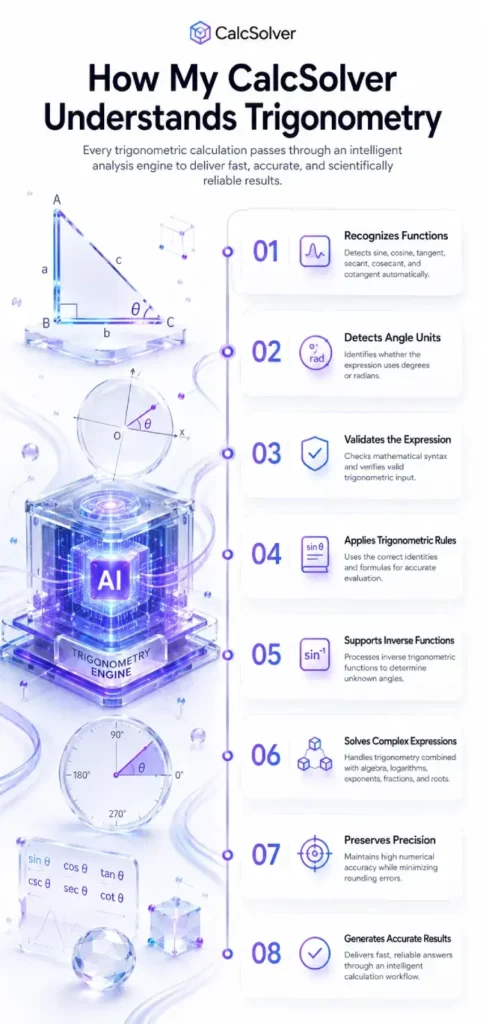
How My CalcSolver Understands Trigonometry
I designed CalcSolver to do much more than calculate sine, cosine, or tangent values. Before producing any result, the calculator analyzes your trigonometric expression, identifies the mathematical functions being used, determines the angle format, and selects the appropriate calculation method automatically. This intelligent workflow improves accuracy, eliminates manual calculations, and helps you solve trigonometric problems with confidence.
Recognizes Trigonometric Functions Automatically
The calculator instantly detects functions such as sin, cos, tan, csc, sec, and cot. This allows the system to understand your mathematical expression without requiring additional setup.
Detects Degrees and Radians
I built the calculation engine to identify whether your input uses degrees or radians. Using the correct angle unit is essential for producing mathematically accurate trigonometric results.
Validates Mathematical Expressions
Before performing any calculation, the system checks that your trigonometric expression follows valid mathematical syntax. This helps prevent common input errors and ensures every calculation starts with a correct mathematical structure.
Applies the Correct Trigonometric Rules
Once the expression has been analyzed, CalcSolver automatically applies the appropriate trigonometric formulas and identities based on the functions involved. This makes solving complex expressions much faster and more reliable.
Supports Inverse Trigonometric Functions
The calculator also evaluates inverse functions such as sin⁻¹, cos⁻¹, and tan⁻¹. These functions help determine unknown angles from known trigonometric values in geometry, engineering, and scientific calculations.
Processes Complex Mathematical Expressions
Trigonometric functions often appear together with algebra, exponents, logarithms, fractions, and square roots. I designed CalcSolver to process these combined expressions accurately while preserving the correct order of mathematical operations.
Maintains High Numerical Precision
Every calculation is performed using a high-precision mathematical engine that minimizes rounding errors and produces reliable results for both simple classroom problems and advanced scientific applications.
Generates Accurate Results Instantly
After validating your input and selecting the correct calculation workflow, CalcSolver evaluates the expression and produces an accurate answer within seconds, helping you solve trigonometric problems quickly while improving your understanding of the mathematics behind them.
Basic Trigonometric Functions
Every trigonometric calculation begins with a few fundamental functions that describe the relationship between the angles and sides of a right triangle. Once you understand what each function represents, solving geometric problems, analyzing angles, and working with scientific calculations becomes much easier. These functions also serve as the foundation for more advanced topics in mathematics, engineering, and physics.
I built CalcSolver to recognize every trigonometric function automatically and evaluate it with high precision. Whether you’re working with degrees, radians, or complete trigonometric expressions, the calculator selects the correct mathematical function and generates reliable results instantly.
Sine (sin)
The sine function measures the relationship between the side opposite an angle and the hypotenuse of a right triangle. It is one of the most commonly used functions in mathematics, physics, and engineering.
Cosine (cos)
The cosine function compares the side adjacent to an angle with the hypotenuse. It is widely used when calculating distances, angles, and horizontal components in engineering and navigation.
Tangent (tan)
The tangent function compares the opposite side with the adjacent side of a right triangle. It is especially useful for calculating slopes, elevations, and angles in surveying, architecture, and construction.
Cosecant (csc)
The cosecant function is the reciprocal of sine. It compares the hypotenuse with the opposite side and is commonly used in higher mathematics and advanced trigonometric identities.
Secant (sec)
The secant function is the reciprocal of cosine. It compares the hypotenuse with the adjacent side and appears frequently in calculus, engineering, and advanced trigonometric equations.
Cotangent (cot)
The cotangent function is the reciprocal of tangent. It compares the adjacent side with the opposite side and is useful when solving geometric relationships and simplifying trigonometric expressions.
Trigonometric Ratios Explained
Trigonometric ratios describe the relationship between the sides of a right triangle for a specific angle. Instead of measuring every side directly, these ratios allow you to calculate unknown lengths and angles using simple mathematical relationships. Once you understand these ratios, solving triangle problems becomes much faster and more accurate.
I designed CalcSolver to recognize these trigonometric ratios automatically and apply the correct formula based on your input. Whether you’re solving a right triangle, verifying an angle, or evaluating a trigonometric expression, the calculator performs the calculations with high precision and generates reliable results instantly.
| Trigonometric Ratio | Formula | Example | What It Represents |
|---|---|---|---|
| sin θ Sine | Opposite ÷ Hypotenuse | 3 ÷ 5 = 0.6 | Measures the relationship between the opposite side and the hypotenuse. |
| cos θ Cosine | Adjacent ÷ Hypotenuse | 4 ÷ 5 = 0.8 | Measures the relationship between the adjacent side and the hypotenuse. |
| tan θ Tangent | Opposite ÷ Adjacent | 3 ÷ 4 = 0.75 | Compares the opposite side with the adjacent side to determine the angle’s slope. |
| Reciprocal Functions | |||
| csc θ Cosecant | Hypotenuse ÷ Opposite | 5 ÷ 3 ≈ 1.667 | The reciprocal of the sine function. |
| sec θ Secant | Hypotenuse ÷ Adjacent | 5 ÷ 4 = 1.25 | The reciprocal of the cosine function. |
| cot θ Cotangent | Adjacent ÷ Opposite | 4 ÷ 3 ≈ 1.333 | The reciprocal of the tangent function. |
These trigonometric ratios form the foundation of trigonometry and are used extensively in mathematics, engineering, navigation, surveying, architecture, physics, and computer graphics. Whenever you enter a trigonometric expression into CalcSolver, the calculator automatically identifies the appropriate ratio, applies the correct mathematical relationship, and produces accurate results with confidence.
Degrees vs Radians
Angles can be measured in two different units, degrees and radians. Degrees are the most familiar because they divide a complete circle into 360 equal parts, while radians measure angles based on the radius of a circle. Both units describe the same angle, but different mathematical problems and software may require one format instead of the other.
I built CalcSolver to support both angle units automatically. Whether your trigonometric expression is written in degrees or radians, the calculator identifies the selected mode, applies the correct mathematical calculations, and generates accurate results without requiring manual conversions.
| Degrees | Radians | Common Angle |
|---|---|---|
| 0° | 0 | Starting angle |
| 30° | π/6 | Special angle used in trigonometry |
| 45° | π/4 | Equal right triangle angle |
| 60° | π/3 | Common geometry angle |
| 90° | π/2 | Right angle |
| 180° | π | Straight angle |
| 270° | 3π/2 | Three-quarter rotation |
| 360° | 2π | Complete circle |
Understanding the relationship between degrees and radians is essential when solving trigonometric expressions, graphing functions, and working with scientific or engineering calculations. CalcSolver allows you to switch between both angle systems effortlessly, ensuring every trigonometric calculation is performed with the correct unit and maximum precision.
By automatically aligning decimal places and applying the correct arithmetic rules, CalcSolver ensures every addition is performed accurately, making it ideal for homework, accounting, engineering calculations, scientific measurements, and everyday mathematics.
FAQs
Conclusion
Trigonometry is one of the most practical branches of mathematics because it helps us understand the relationship between angles and distances. Once you learn the fundamental trigonometric functions, ratios, angle units, and identities, solving geometric, scientific, and engineering problems becomes much easier. These concepts are used every day in fields ranging from architecture and navigation to computer graphics and artificial intelligence.
I created this page to make trigonometry easier to understand through clear explanations, practical examples, and real-world applications. Whenever you need to evaluate trigonometric functions, compare angles, work with degrees or radians, or solve complex expressions, you can rely on CalcSolver. The calculator intelligently analyzes every trigonometric expression, applies the correct mathematical rules, and delivers fast, accurate results, helping you solve problems with confidence while strengthening your understanding of trigonometry.