
CalcSolver Free Percentage Calculator 2026
When I started building online math tools, I realized that percentage calculations were something people searched for every single day. Whether you’re calculating a shopping discount, exam score, sales tax, tip, profit margin, salary increase, or simply trying to find a percentage of a number, doing it manually can be confusing and time-consuming. That’s why I created the CalcSolver Percentage Calculator to give you fast, accurate answers while helping you understand how every calculation works.
Whether you need a Percentage Calculator, Percent Calculator, Percentage Difference Calculator, or Percentage Increase Calculator, this tool is built to handle them all in one place. Simply enter your values, and I’ll instantly calculate percentages, explain the percentage formula, and show the complete step-by-step result so you can solve everyday percentage problems with confidence.
What Is a Percentage?
Before you start using a Percentage Calculator, it’s important to understand what a percentage actually means. In simple words, a percentage tells you how many parts out of every 100 something represents. The word percent literally means “per hundred,” which is why percentages are always written using the % symbol. For example, 25% means 25 out of every 100, while 50% simply means half of the total value.
I always explain percentages as a way of comparing values because they’re much easier to understand than fractions or decimals. For example, if 18 out of 20 students pass an exam, saying the pass rate is 90% is much clearer than saying 18/20 or 0.9. Whether you’re calculating discounts, exam scores, taxes, business profits, commissions, or salary increases, percentages make it easy to compare numbers of different sizes using the same standard of 100.
Here are a few simple examples:
25 students out of 100 passed an exam
You scored 45 marks out of 60
A product costs $80 after a 20% discount
A company’s sales increase from 500 to 600
Instead of remembering these calculations manually, you can simply enter your values into my CalcSolver Percentage Calculator. I’ll automatically apply the correct percentage formula, calculate the result with precision, and explain every step so you understand not only the answer but also how the percentage was calculated.
What Is My Percentage Calculator and How Does It Work?
My Percentage Calculator is much more than a tool that simply multiplies or divides numbers. I designed it with an intelligent calculation engine that understands what you’re trying to calculate before performing any mathematical operation. Whether you’re finding a percentage of a number, calculating a discount, comparing two values, or working out a percentage increase or decrease, the system automatically identifies your goal and selects the most appropriate percentage formula for the calculation.
Behind the scenes, I combined advanced mathematical algorithms with AI-assisted input analysis to make the calculator feel more like a smart math assistant than a traditional calculator. As soon as you enter your values, the system recognizes your input pattern, validates the numbers, chooses the correct calculation method, performs precision checks, and generates an accurate step-by-step result. My goal isn’t just to calculate percentages quickly, but to help you understand every result with confidence while delivering the speed and accuracy you expect from a modern calculation tool.
How to Use the CalcSolver Percentage Calculator
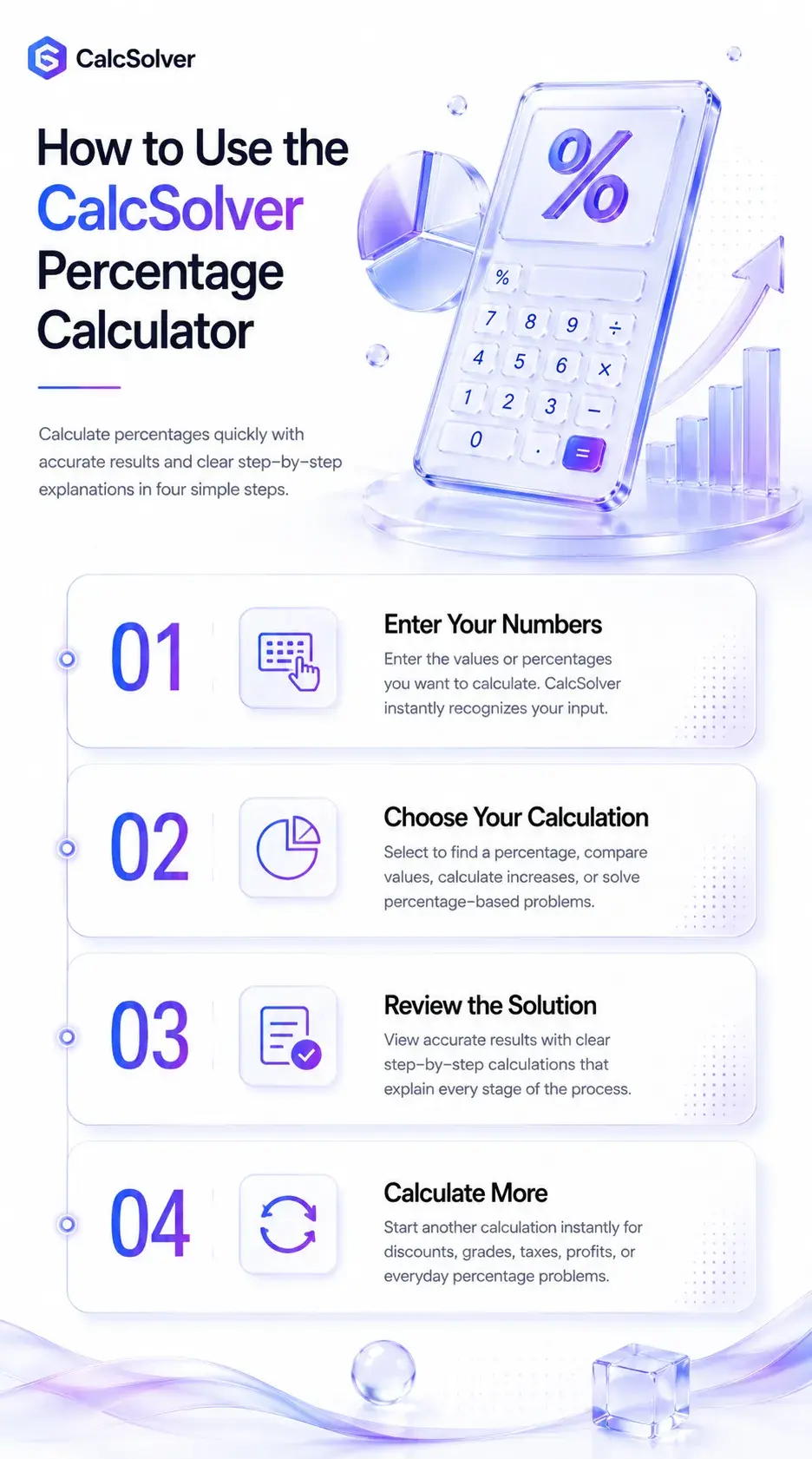
I designed my Percentage Calculator so you never have to wonder how to calculate percentage or remember a complicated percentage formula again. Whether you want to calculate percentage, find percentage of a number, or use it as a smart Percent Calculator, the entire process takes only a few seconds and requires just a few simple steps.
Enter Your Numbers
Start by entering the numbers you already know. For example, you can enter 20% of 500, 75 is what percentage of 300, or two values to compare. As soon as you enter your data, I analyze your input and prepare it for the correct percentage calculation automatically.
Choose the Calculation You Need
Next, tell me what you want to calculate. You can find percentage, calculate a percentage of a number, use the Percentage Difference Calculator to compare two values, or calculate an increase using the Percentage Increase Calculator. I instantly recognize your selection and apply the most accurate percentage formula without requiring any manual calculations.
Review the Step-by-Step Calculation
Once the calculation is complete, I don’t just display the final answer. I explain every mathematical step so you can understand how to find percentage, verify your results, and learn the calculation method instead of simply copying the answer.
Calculate More Percentages Anytime
After finishing one calculation, you can immediately start another without refreshing the page. Whether you’re calculating shopping discounts, exam percentages, salary increases, business profits, taxes, or everyday percentages, the CalcSolver Percentage Calculator is always ready to deliver fast, accurate, and easy-to-understand results.
What Can This Percentage Calculator Calculate?
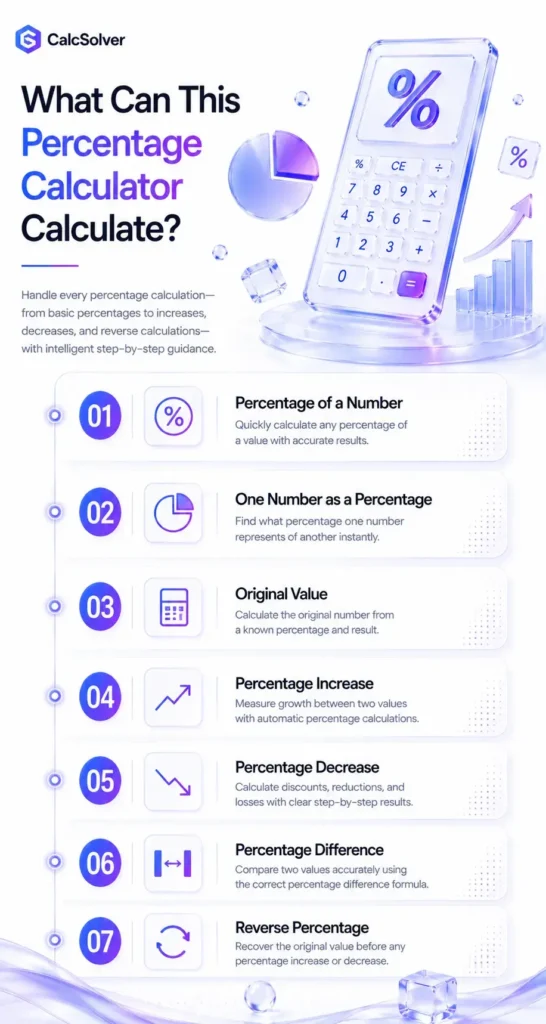
No matter what type of percentage problem you’re trying to solve, I designed this Percentage Calculator to give you the correct answer without making you remember complicated formulas. Whether you’re wondering what percentage of a number you have, trying to find percentage of a number, or learning how to calculate percentages, the calculator automatically recognizes your goal and applies the right mathematical method. It’s your all-in-one Percent of Calculator, making percentage calculations faster, easier, and more accurate.
Calculate a Percentage of a Number
If you’re asking questions like “What is 20% of 450?”, simply enter the values and I’ll calculate the answer instantly. This is one of the most common percentage calculations used for discounts, taxes, commissions, and budgeting. If you’re learning how to find percentage of a number, this feature also explains every calculation step so you understand the process.
Find What Percentage One Number Is of Another
Many people search for what percentage one value represents compared to another. For example, if you enter 75 and 300, I’ll calculate that 75 is 25% of 300 while showing exactly how the percentage is obtained. This is one of the easiest ways to answer questions like “What percentage of 300 is 75?”
Find the Original Number from a Percentage
Sometimes you know the percentage and the final result but not the original value. For example, if 25% equals 50, I’ll calculate that the original number is 200. This reverse calculation is especially useful if you’re wondering how to get percentage backwards after a discount, tax, or price change.
Calculate Percentage Increase
If you want to compare growth between two values, simply enter both numbers and I’ll calculate the increase automatically. For example, if your salary increases from $2,500 to $3,000, the calculator shows a 20% increase together with the complete working, making it easy to understand percentage growth over time.
Calculate Percentage Decrease
Percentage decreases are commonly used for shopping discounts, price reductions, business losses, and financial reports. For example, if a product price drops from $120 to $90, I’ll calculate the 25% decrease and explain every step so you never have to figure out percentage manually.
Calculate Percentage Difference
Comparing two independent numbers requires a different mathematical approach than calculating percentage change. Enter values such as 120 and 150, and the calculator uses the correct Percentage Difference formula to compare them accurately. This feature is ideal for statistics, research, engineering, and data analysis.
Calculate Reverse Percentages
Reverse percentage calculations help you recover the original value before an increase or decrease was applied. For example, if an item costs $180 after a 10% discount, I’ll calculate that its original price was $200. This saves you from performing complex manual calculations and is much faster than using a traditional Kalkulator Persen or basic calculator.
Percentage Formulas You Should Know
You don’t need to memorize every Percentage Formula to solve percentage problems correctly. I built the CalcSolver Percentage Calculator to apply the right formula automatically based on your calculation. Still, understanding these formulas will help you learn how to calculate percentage, verify your answers, and confidently solve percentage questions without relying entirely on a calculator.
Basic Percentage Formula
A class has 25 boys out of 40 students. (25 ÷ 40) × 100 = 62.5%. Therefore, 62.5% of the class are boys.
Percentage Increase Formula
A salary increases from $2,500 to $3,000. ((3000 − 2500) ÷ 2500) × 100 = 20% increase.
Percentage Decrease Formula
A laptop price drops from $800 to $680. ((800 − 680) ÷ 800) × 100 = 15% decrease.
Percentage Difference Formula
Compare 120 and 150. Difference = 30, Average = 135. (30 ÷ 135) × 100 = 22.22% percentage difference.
Reverse Percentage Formula
A jacket costs $90 after a 10% discount. 90 ÷ 0.90 = $100, so the original price was $100.
Instead of remembering which formula to use, simply enter your values into my Percentage Calculator. I’ll instantly identify the correct percentage calculation formula, perform the calculations with precision, and explain every step so you can learn while getting the right answer.
How to Calculate Percentage Step by Step
Many people search for how to calculate percentage, but the process becomes much easier when you understand which numbers to use and which percentage calculation formula applies to your situation. Whether you’re calculating exam scores, shopping discounts, salary increases, or business profits, I designed this guide to teach you the calculation process with simple examples. If you don’t want to solve it manually, you can always use my Percentage Calculator Online, which performs every calculation automatically and explains each step.
How to Calculate Percentage of a Number
If you want to know how to calculate percentage of a number, simply multiply the number by the required percentage and divide the result by 100. This is the most common formula for percentage used in everyday calculations.
Find 25% of 240
You can also use my Percentage of Calculator if you want to calculate percentage of a number instantly without performing the calculation yourself.
How to Find Percentage Between Two Numbers
If you’re comparing two numbers and wondering what is the percentage of one number compared to another, divide the first value by the second value and multiply the result by 100.
Find what percentage 45 is of 60
This method is commonly used to compare exam marks, business performance, survey results, and sales reports.
How to Find What Percent of a Number
Many people ask how to do percentages when they already know the part and the whole. The solution is simple because you use exactly the same formula of percentage by dividing the smaller value by the total value and multiplying by 100.
A company sold 180 products out of 240
If you prefer not to calculate manually, my calculator completes the process within seconds while showing every mathematical step.
How to Work Out Percentage Quickly
The fastest way to work out percentages is by using a reliable calculator instead of remembering different formulas for every situation. Whether you’re searching for how to compute percentage, percentage kaise nikale, hitung persen, menghitung persen, or using a Kalkulator Persentase, my calculator automatically identifies the correct method and performs the calculation with high precision.
For example, if you need to calculate 18% of 350, simply enter the values, and the calculator instantly returns 63 together with the complete calculation process.
How to Calculate Money Percentages
Money percentages are used every day for discounts, taxes, commissions, profits, interest, and salary changes. To calculate percentage of money, simply multiply the amount by the required percentage and divide by 100, just as you would with any other percentage calculation.
Calculate 15% of $800
Whether you’re calculating shopping discounts, business profits, or financial savings, my Percentage Calculator Online performs every calculation accurately so you don’t have to worry about manual errors.
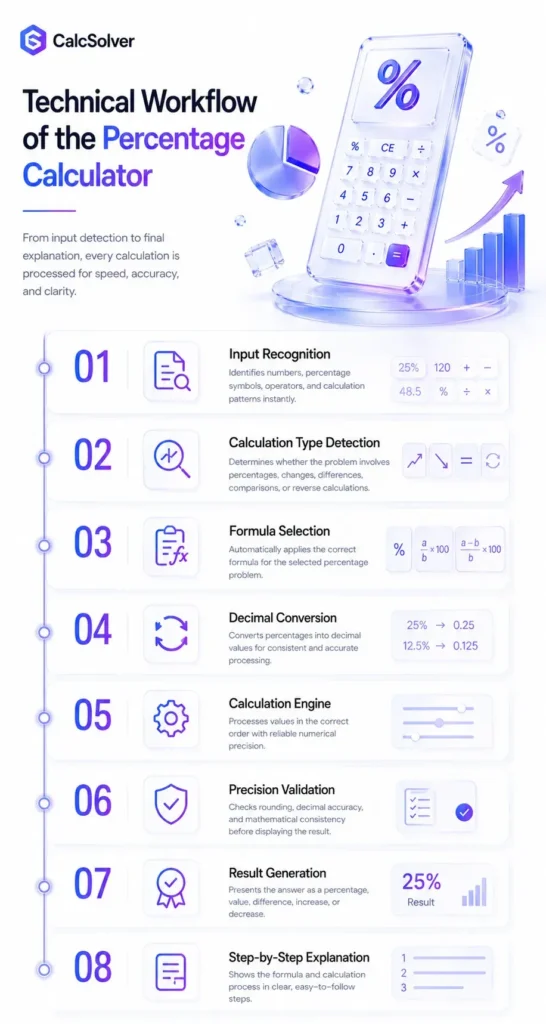
Technical Workflow of the Percentage Calculator
When you enter a percentage problem into my calculator, several intelligent processes begin working in the background. I designed the system to understand your intent first, select the correct mathematical method, and then produce a result that is accurate, clear, and easy for you to verify.
Input Recognition
The first step is understanding the numbers and symbols you enter. Whether you type 25% of 400, 75 is what percent of 300, or compare two values, my system recognizes the percentage sign, numerical values, operators, and calculation pattern before doing any math.
Percentage Type Detection
Not every percentage problem is the same, so I first identify what you are trying to calculate. The system detects whether you need a basic percentage, percentage increase, percentage decrease, percentage difference, reverse percentage, or a comparison between two numbers.
Formula Selection
Once the calculation type is clear, I automatically choose the correct formula. You do not need to decide whether to use the basic percentage formula, percentage change formula, or percentage difference formula because my engine matches the formula to your exact problem.
Decimal Conversion
Percentages are processed more accurately when they are converted into decimal form. For example, the system converts 25% into 0.25 before multiplying it by the original value, which helps keep the calculation consistent and mathematically correct.
Calculation Engine
This is where the main percentage calculation takes place. My calculation engine processes the values in the correct order, applies the selected formula, and handles increases, decreases, comparisons, discounts, taxes, and money percentages with reliable numerical precision.
Precision Validation
Before showing your answer, I check the calculation for rounding issues and mathematical consistency. This step helps reduce errors, especially when the result contains long decimal values or needs to be displayed as a clean percentage.
Result Generation
After the calculation has been verified, I generate the final result in the most useful format. Depending on your question, the answer may appear as a percentage, decimal, original value, increased amount, decreased amount, or percentage difference.
Step-by-Step Explanation
I do not want you to see only the final number. I rebuild the complete calculation into simple steps so you can understand which formula was used, how the values were processed, and why the final answer is correct.
Common Problems and Their Solutions While Using My Percentage Calculator
I designed the CalcSolver Percentage Calculator to make percentage calculations as simple as possible, but incorrect inputs or misunderstandings can still lead to confusing results. The table below covers the most common technical and calculation-related problems I’ve seen from users, along with the quickest way to solve them so you can calculate percentages with confidence.
I don’t know which percentage calculation to choose.
Don’t worry about selecting a formula manually. Simply enter your values and choose your goal, such as finding a percentage, percentage increase, percentage decrease, or percentage difference. My calculator automatically applies the correct mathematical formula.
My answer looks different from my manual calculation.
This usually happens because the wrong formula was used or the order of calculations was incorrect. Compare the calculator’s step-by-step explanation with your work to quickly identify where the mistake occurred.
I entered only one value and can’t calculate the result.
Most percentage calculations require at least two values. For example, to calculate 20% of 500, you need both the percentage and the original number before the calculator can generate an answer.
I’m confused between Percentage Change and Percentage Difference.
These calculations solve different problems. Percentage Change compares a new value with an original value, while Percentage Difference compares two independent values using their average. My calculator automatically separates these calculations to prevent incorrect results.
The percentage increase doesn’t match what I expected.
Make sure you’re using the original value as the starting point. Percentage Increase is always calculated relative to the initial number, not the final value. The calculator performs this automatically for accurate results.
I don’t know how to calculate discounts or sale prices.
Simply enter the original price and the discount percentage. The calculator instantly shows the discount amount and the final payable price with complete calculation steps.
The result contains many decimal places.
Some percentage calculations naturally produce decimal values. My calculator uses high-precision calculations internally and displays a clean, rounded result while preserving mathematical accuracy.
I accidentally entered the percentage as a decimal.
You can simply enter the percentage value, such as 25 instead of 0.25. The calculator automatically converts percentages into the correct decimal format before performing the calculation.
I entered the numbers in the wrong order.
Reversing the original and final values can completely change the result, especially for percentage increases and decreases. Double-check your inputs, and the calculator will immediately generate the correct answer.
My calculation involves very large numbers.
Whether you’re calculating percentages for business reports, financial data, investments, or scientific values, my calculation engine is optimized to process both small and very large numbers accurately.
I’m not sure whether my final answer is correct.
Every result includes a clear, step-by-step explanation so you can verify each stage of the calculation instead of relying only on the final percentage. This helps you learn the method while confirming the accuracy of your answer.
I want to calculate another percentage after finishing one calculation.
There’s no need to refresh the page or restart the tool. Simply replace the previous values with new ones, and the calculator will instantly process your next percentage calculation using the appropriate formula.
FAQs
Conclusion
Calculating percentages shouldn’t feel complicated, whether you’re working on homework, comparing business data, calculating shopping discounts, or managing your personal finances. That’s exactly why I created the CalcSolver Percentage Calculator. My goal is to give you more than just a number by helping you understand every calculation with accurate formulas, step-by-step explanations, and real-world examples you can apply with confidence.
Whether you need to calculate percentage, find what percentage of a number, compare two values, calculate percentage increases or decreases, or solve everyday percentage problems, this tool is ready to help. Simply enter your values, let the calculator do the work, and use the results to make faster, smarter, and more confident decisions every time.