CalcSolver Logarithm Calculator 2026
Have you ever wondered how calculators solve expressions such as log(100) or ln(e²) within seconds? Logarithms may look difficult at first, but they are simply a mathematical way of finding an exponent. They are widely used in mathematics, computer science, engineering, finance, and many scientific fields where large or small numbers need to be analyzed efficiently.
I created this Logarithm Calculator to help you understand logarithms through simple explanations, practical examples, and real mathematical applications. You’ll learn what a logarithm is, how different logarithmic functions work, when to use them, and how CalcSolver intelligently evaluates logarithmic expressions, applies the correct rules, and produces fast, accurate results for every calculation.
What Is a Logarithm Calculator?
A logarithm is a mathematical function that tells you the exponent needed to produce a specific number. For example, since 10² = 100, the logarithm of 100 with base 10 is 2. Instead of asking “What is the result of an exponent?”, a logarithm asks “What exponent created this value?” This simple idea makes it much easier to work with very large and very small numbers.

I think of logarithms as the reverse of exponents because the two concepts always work together. That’s why I designed CalcSolver to recognize logarithmic expressions automatically, evaluate different logarithm bases, simplify calculations, and solve complex logarithmic problems with high precision, allowing you to focus on understanding the mathematics instead of performing lengthy manual calculations.
Why Logarithms Are Important
Logarithms are much more than a classroom topic because they make complex calculations faster, simpler, and easier to understand. I use them whenever I work with exponential growth, scientific measurements, computer algorithms, financial models, or large numerical datasets. Without logarithms, many advanced mathematical and scientific calculations would require far more time and effort.
I built CalcSolver to handle logarithmic calculations intelligently, allowing you to evaluate expressions, solve equations, and verify results with confidence. Whether you’re studying mathematics, working on engineering problems, analyzing scientific data, or learning computer science, the calculator automatically applies the correct logarithmic rules and produces accurate results within seconds.

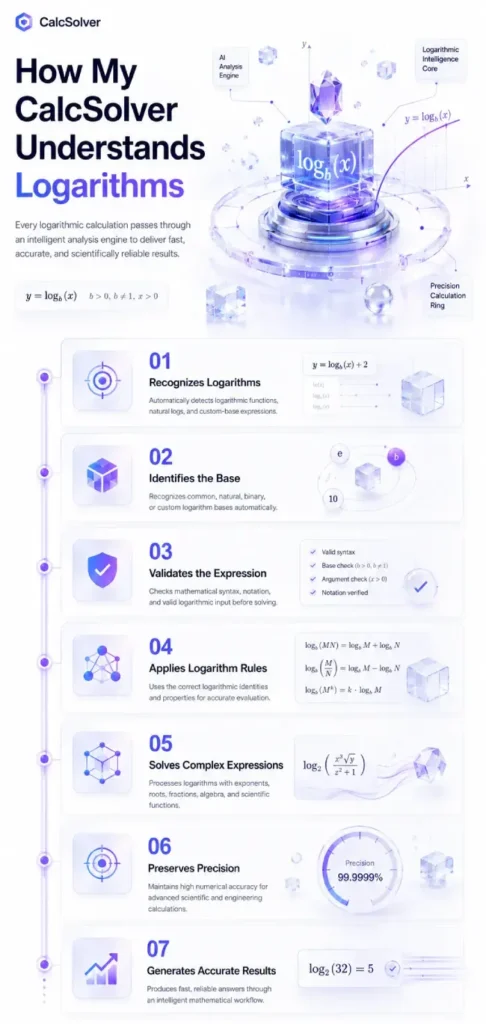
How My CalcSolver Understands Logarithms
I designed CalcSolver to do much more than evaluate logarithmic expressions. Before producing a result, the calculator analyzes your input, identifies the logarithm type, determines the correct base, and selects the appropriate mathematical rules automatically. This intelligent workflow improves calculation accuracy while eliminating the need to remember complex logarithmic identities or perform lengthy manual calculations.
Recognizes Logarithmic Expressions Automatically
The calculator immediately detects logarithmic functions such as log(100), ln(e²), or custom base expressions. This allows the system to understand your mathematical input without requiring additional formatting.
Identifies the Correct Logarithm Base
I built the engine to recognize whether your expression uses a common logarithm, natural logarithm, binary logarithm, or a custom base. Selecting the correct base is essential for producing mathematically accurate results.
Validates Mathematical Syntax
Before starting any calculation, the system checks that your logarithmic expression follows valid mathematical rules. This helps prevent errors caused by invalid arguments, incorrect notation, or unsupported input.
Applies Logarithm Rules Automatically
Once the expression has been analyzed, CalcSolver intelligently applies the appropriate logarithmic identities and mathematical properties to simplify or evaluate the expression as efficiently as possible.
Supports Complex Mathematical Expressions
Logarithms often appear together with exponents, roots, fractions, algebraic expressions, and scientific functions. The calculation engine processes these combined expressions accurately while preserving the correct order of operations.
Maintains High Numerical Precision
I designed the calculator to produce reliable results even for large numbers, very small values, and advanced scientific calculations where decimal precision is extremely important.
Generates Accurate Results Instantly
After completing every validation and mathematical step, CalcSolver delivers the final answer within seconds. My goal is to provide not only the correct result but also a dependable calculation process that you can trust for learning, research, and professional work.
Common Types of Logarithms
Not every logarithm uses the same base. Different branches of mathematics, science, engineering, and computer science use different logarithmic functions depending on the calculation being performed. Understanding these types will help you recognize when each one should be used and why the results may differ even when the same number is involved.
I designed CalcSolver to identify every logarithm type automatically before starting a calculation. Whether you enter a common logarithm, natural logarithm, binary logarithm, or a custom base, the calculator detects the correct mathematical function and evaluates it with high precision.
Common Logarithm
A common logarithm uses 10 as its base and is written as log(x). This is the most frequently used logarithm in school mathematics, engineering, physics, and scientific calculations.
Natural Logarithm (ln)
A natural logarithm uses the mathematical constant e, which is approximately 2.71828, as its base. It is written as ln(x) and is widely used in calculus, economics, biology, statistics, and exponential growth models.
Binary Logarithm
A binary logarithm uses 2 as its base and is commonly written as log₂(x). This logarithm plays an important role in computer science, digital electronics, algorithms, and information theory.
Custom Base Logarithm
A custom base logarithm allows you to use any positive base greater than 0, except 1. I built CalcSolver to evaluate custom logarithmic bases automatically, making it easy to solve specialized mathematical, engineering, and scientific problems without performing manual conversions.
Basic Logarithm Rules
Learning a few basic logarithm rules makes solving complex expressions much easier. Instead of calculating every logarithm from the beginning, these mathematical identities allow you to simplify expressions, combine logarithms, and solve equations more efficiently. I rely on these rules whenever I evaluate logarithmic calculations because they provide a faster and more accurate approach.
I built CalcSolver to apply these logarithm rules automatically whenever they are needed. The calculator analyzes your expression, selects the appropriate identity, simplifies the calculation, and generates an accurate result without requiring you to memorize every formula.
logₐ(M × N) = logₐ(M) + logₐ(N)
log₁₀(100 × 10) = log₁₀(100) + log₁₀(10) = 2 + 1 = 3
logₐ(M ÷ N) = logₐ(M) − logₐ(N)
log₁₀(100 ÷ 10) = 2 − 1 = 1
logₐ(Mⁿ) = n × logₐ(M)
log₁₀(10³) = 3 × log₁₀(10) = 3
logₐ(M) = log(M) ÷ log(a)
log₂(8) = log(8) ÷ log(2) = 3
logₐ(aˣ) = x
log₁₀(10⁴) = 4
aˡᵒᵍₐ(M) = M
10ˡᵒᵍ¹⁰⁰⁰ = 1000
These logarithm identities are used throughout algebra, calculus, engineering, computer science, data analysis, and scientific research. Whenever you enter a logarithmic expression into CalcSolver, the system automatically recognizes the applicable rule, simplifies the expression where possible, and performs the calculation with high precision.
How to Calculate Logarithms
Calculating logarithms becomes much easier once you understand that every logarithm is asking one simple question: “What exponent produces this number?” Instead of memorizing complicated procedures, I recommend learning a few basic techniques that work for almost every logarithmic calculation. Once you understand these methods, solving logarithms becomes much more intuitive.
I designed CalcSolver to perform every step automatically. Whether you need to evaluate a logarithm, solve a logarithmic equation, change the logarithm base, or simplify a complex expression, the calculator analyzes your input and applies the correct mathematical rules to generate an accurate result within seconds.
Evaluate a Logarithm
The simplest way to calculate a logarithm is to determine which exponent produces the given value. For example, log₁₀(1000) = 3 because 10³ = 1000. Instead of solving this manually, you can enter the expression into CalcSolver, and the calculator immediately returns the correct answer.
Solve Logarithmic Equations
Some problems contain variables inside logarithmic expressions, such as log(x) = 2. In this case, the logarithm is first converted into its exponential form before solving for the unknown value. I built CalcSolver to recognize these equations automatically and solve them using the correct mathematical process.
Convert Between Logarithm Bases
Not every logarithm uses the same base, and sometimes a calculation requires converting one base into another. The calculator automatically applies the Change of Base Formula whenever necessary, allowing you to evaluate custom logarithms without performing additional calculations yourself.
Simplify Logarithmic Expressions
Many logarithmic expressions can be simplified by applying mathematical identities such as the Product Rule, Quotient Rule, and Power Rule. Instead of simplifying these expressions manually, CalcSolver detects the appropriate identity and performs the simplification automatically before evaluating the final result.
Verify Mathematical Results
After completing every calculation, I always recommend verifying the answer by converting the logarithm back into its exponential form. CalcSolver performs this verification internally whenever possible, helping ensure that every logarithmic calculation is mathematically consistent and highly accurate.
Real Life Applications of Logarithms
Although logarithms are often introduced in mathematics classrooms, they play an important role in many real-world applications. I frequently use logarithmic concepts to explain how computers process data, how scientists analyze measurements, and how engineers solve complex problems. Understanding these practical uses helps you appreciate why logarithms remain one of the most valuable mathematical tools.
I built CalcSolver to support these calculations because logarithms appear in many professional fields where precision is essential. Whether you’re solving academic problems or working with scientific and engineering calculations, the calculator evaluates logarithmic expressions accurately and helps you understand their practical significance.
Mathematics
Simplify exponential expressions, solve logarithmic equations, and analyze mathematical models.
Computer Science
Measure algorithm efficiency, analyze data structures, and optimize search and sorting operations.
Artificial Intelligence
Support machine learning algorithms, probability calculations, and information processing models.
Engineering
Solve electrical circuits, communication systems, signal processing, and control systems.
Physics
Calculate sound intensity, radioactive decay, wave behavior, and energy measurements.
Chemistry
Measure pH values, reaction rates, and chemical concentrations using logarithmic scales.
Finance
Analyze compound growth, investment returns, interest calculations, and financial forecasting.
Statistics & Data Science
Transform data, normalize distributions, and improve analytical models for large datasets.
Earth Science
Measure earthquake magnitude using logarithmic scales such as the Richter scale.
Telecommunications
Calculate signal strength, bandwidth, and transmission performance using logarithmic relationships.
By understanding these applications, you’ll see that logarithms are much more than theoretical mathematics. They are practical tools used every day across science, technology, engineering, finance, and computing, and CalcSolver helps you solve these logarithmic calculations quickly, accurately, and with confidence.
Common Logarithm Mistakes and Their Solutions
Logarithm problems are usually not difficult because of the calculations themselves. Most mistakes happen when the wrong logarithm rule is applied, the base is ignored, or the expression is interpreted incorrectly. I designed CalcSolver to validate every logarithmic expression before solving it, helping reduce these common errors and ensuring accurate mathematical results.
Ignoring the logarithm base
Many users assume every logarithm uses the same base.
Always identify whether the expression uses base 10, base e, base 2, or another custom base before solving.
Confusing log with ln
Users often think both functions produce the same result.
Remember that log usually represents base 10, while ln represents the natural logarithm with base e.
Calculating the logarithm of zero
A common misunderstanding of the logarithm domain.
A logarithm of 0 is undefined because no exponent can produce zero from a positive base.
Using negative numbers inside a logarithm
The logarithm function only accepts positive arguments in real-number calculations.
Ensure the value inside the logarithm is greater than zero before evaluating the expression.
Applying the wrong logarithm rule
Product, Quotient, and Power Rules are sometimes mixed together.
Identify the mathematical operation first, then apply the corresponding logarithm identity correctly.
Skipping parentheses
Missing parentheses change the mathematical meaning of the expression.
Always write logarithmic expressions with proper grouping so the calculator evaluates the intended operation.
Using an invalid logarithm base
A logarithm base cannot be 1 or a negative number.
Use a positive base greater than zero that is not equal to 1.
Incorrectly converting between logarithm bases
The Change of Base Formula is applied incorrectly or forgotten.
Use the correct conversion formula or allow CalcSolver to perform the conversion automatically.
Rounding values too early
Early rounding introduces unnecessary calculation errors.
Keep full precision throughout the calculation and round only after obtaining the final answer.
Ignoring expression validation
Users attempt to solve incomplete or invalid logarithmic expressions.
Enter the complete mathematical expression into CalcSolver, which automatically validates the syntax before performing the calculation.